Kick Drum EQ Guide: How to EQ a Kick for Maximum Punch & Clarity
Have you ever mixed a track where the kick drum sounds massive in solo mode, but completely disappears the moment the bass guitar and synthesizers enter the arrangement? This is the most common mixing hurdle in music production. The kick drum and the bass instrument share the exact same narrow band of low frequencies. Without proper kick equalization, these two elements clash, creating a muddy, undefined rumble that destroys the headroom of a mix.
Applying an equalizer on a kick drum is not about randomly boosting the low end. It is about strategic subtraction and targeted enhancement. This guide breaks down the complete kick drum frequency range, provides a reliable kick drum eq cheat sheet (you can also find full mixing cheat sheet – here), and outlines the step-by-step workflow for equalizing kicks so they punch through any dense mix.
Introduction: The Importance of Sound Selection
Before touching a kick equalization, one fundamental rule must be established: EQ cannot fix a fundamentally bad sound.
If the source sample lacks physical weight or the acoustic recording was captured with a poorly placed microphone, trying to force it to sound massive will only introduce phase issues and artificial resonance. Sound selection is step zero. Always choose a kick drum sample that already fits the genre before applying any processing.
The 5 Magic Frequency Zones (Kick Drum Cheat Sheet)
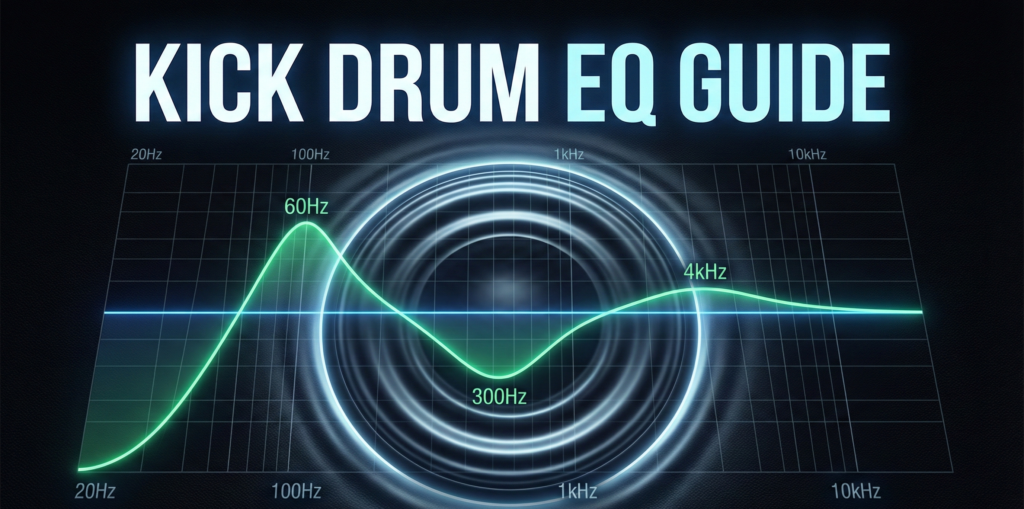
To master kick drum equalization, an engineer must understand where the different characteristics of the drum live. While every sample is unique and you must always trust your ears, this kick drum eq cheat sheet provides the universal starting points for frequency shaping.
- Sub-Bass (20Hz – 40Hz): This is the physical rumble felt in the chest and on club subwoofers. It contains very little audible tone but carries massive energy. Proceed with caution here.
- Thump / Body (50Hz – 100Hz): This is the fundamental pitch of the drum. This zone provides the actual “punch.” Boosting here gives the kick its heavy, driving force.
- Mud / Boxiness (200Hz – 400Hz): These are the primary kick drum problem frequencies. A buildup in this area makes the drum sound like a cardboard box. This zone almost always requires a surgical cut.
- Knock (1kHz – 2kHz): This is the sound of the wooden or plastic beater physically striking the drum skin. It provides the aggressive “knock” favored in Rock and Metal.
- Click / Snap (3kHz – 5kHz): This high-frequency zone is crucial. Boosting the “click” ensures the kick translates and is audible on small smartphone or laptop speakers that cannot reproduce low frequencies.
Acoustic vs. Electronic Kick: The Strategy Difference
Two different types of kicks require two whole different approaches, which are necessary to master.
The Acoustic Kick
A live acoustic kick drum is recorded with microphones. It will naturally contain room resonance, microphone bleed from the snare and cymbals, and a heavy buildup in the low-mids. On an acoustic track requires surgical, narrow cuts to remove this unwanted resonance before any tonal boosting begins.
The Electronic Kick (Samples & 808s)
Electronic kicks, such as those synthesized in a TR-808 or pulled from modern sample packs, are usually pre-processed. They are already compressed and EQ’d by the sound designer. When applying a kick eq to these samples, use broad, gentle curves. The goal is to gently shape the sample to fit your specific track, not to reinvent its tone. “Do not break what is already working.”
Step-by-Step EQ Workflow
When applying a kick drum equalization chain, follow this subtractive-first methodology.
- High-Pass Filtering (The Cleanup): Apply a High-Pass Filter (HPF) with a steep slope (24dB/oct) at 20Hz to 30Hz. This removes inaudible sub-sonic rumble and DC offset, freeing up valuable headroom for the mastering limiter. Do not cut higher than 40Hz, or the kick will lose its physical weight.
- Surgical Cuts (Removing Mud): Sweep a narrow EQ bell (High Q) between 250Hz and 400Hz to find the “cardboard” resonance. Once identified, apply a cut of -3dB to -6dB. This instantly clarifies the drum.
- Tonal Shaping (The Smiley Face): Now, enhance the good parts. Apply a broad boost (+2dB) at the fundamental frequency (60Hz – 80Hz) for thump. Apply a high-shelf boost (+3dB) at 4kHz – 5kHz for the click.
Kick vs. Bass: The “Pocket” Technique
The most critical aspect of kick equalization is how it interacts with the bassline. They cannot occupy the exact same frequencies simultaneously. You must carve a “pocket” for each.
- Frequency Masking Avoidance: Decide which instrument will be the lowest element in the mix. If you decide the Kick will dominate the sub (50Hz), you must apply a slight EQ cut to the Bass track at 50Hz. Conversely, if the Bass is dominating the sub, the Kick should be boosted higher up, around 80Hz or 90Hz.
- The Yin and Yang: Wherever you boost the kick, cut the bass. Wherever you boost the bass, cut the kick.
Common Kick EQ Mistakes
Avoid these frequent pitfalls when utilizing a kick drum eq:
- EQing in Solo Mode: Never finalize an eq for kick drum while the track is soloed. A kick that sounds incredibly bass-heavy and massive in solo will instantly turn your full mix into a muddy disaster. Always adjust the EQ while the bass and vocals are playing.
- Boosting Too Much Sub: Pushing the 30Hz range recklessly will trigger limiters too early, resulting in a quiet, distorted master.
- Ignoring the Highs: Producers often focus entirely on the low end. Without the 4kHz “click,” a kick drum is invisible on consumer playback systems.
Best EQ Plugins for Kick Drums (Free & Paid)
While the principles of equing kicks apply to any software, certain tools make the job easier.
- FabFilter Pro-Q 4 (Paid): The industry standard. Its dynamic EQ feature allows you to cut the mud (300Hz) only when the frequencies build up too much, keeping the drum sounding natural.
- Pultec EQP-1A Emulations (Paid/Free): The legendary hardware equalizer. Using a Pultec plugin allows you to utilize the famous “Low End Trick” (boosting and attenuating the same low frequency simultaneously) to tighten the sub-bass dramatically.
- Stock DAW EQs (Free): The built-in parametric EQs in Logic Pro, Ableton Live, or FL Studio are mathematically pristine and 100% capable of professional kick drum equalization.
Conclusion
Mastering the kick drum eq is a rite of passage for every mixing engineer. By utilizing the “Smiley Face” curve—boosting the sub-thump, surgically removing the muddy mid-range, and enhancing the high-frequency click—you ensure your drums command authority on any speaker system.
Remember the pocket technique: your kick eq decisions must always be made in direct relation to your bassline. Ready to apply these techniques? Make sure your drum transients and compressor release times are perfectly in time with your track by using our [Link: BPM to MS Calculator] for rhythmic perfection.
FAQ
The physical “punch” or thump of a kick drum generally resides between 50Hz and 100Hz. Find the fundamental pitch of your specific sample within this range and apply a gentle, wide boost.
This boxy sound is caused by kick drum problem frequencies building up in the lower mid-range. Applying a bell cut around 250Hz to 400Hz will remove this unflattering resonance.
Yes, but carefully. A steep high pass filter around 20Hz to 30Hz cleans up useless sub-sonic rumble that eats up headroom. Cutting higher than 40Hz risks removing the physical impact of the drum.
Phone speakers cannot reproduce low sub-bass. To make the drum translate, you must use your equalizer kick drum to boost the attack phase. Add a high-shelf boost between 3kHz and 5kHz to emphasize the “click.”